
AI Arrest Filter: Make the Viral “Getting Arrested Again” Video
One ordinary photo in, a six-second clip of you laughing in handcuffs out. Here is how the trend works, the prompt that produces it, and the three things that go wrong in almost every AI arrest filter video.
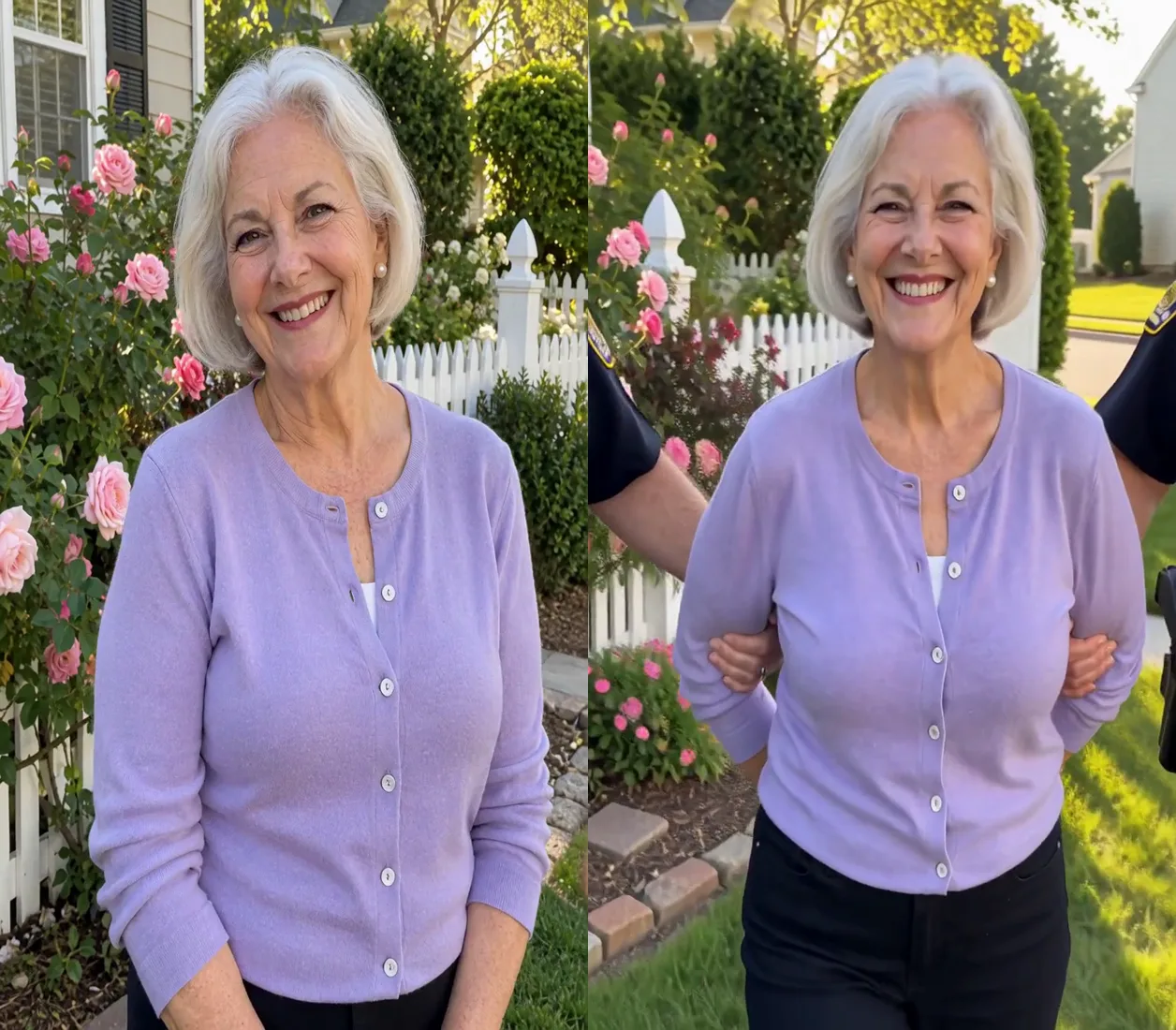
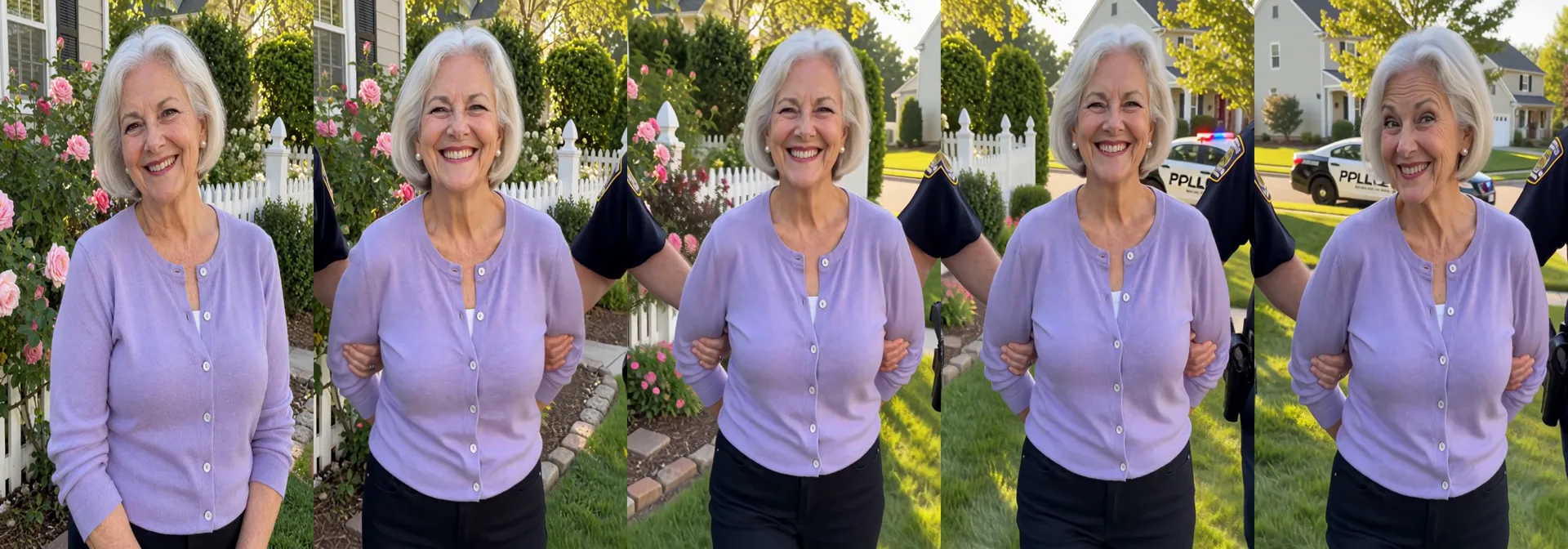
The AI arrest filter is the image-to-video trend filling TikTok, Reels, and X right now: you upload one photo of yourself, and the model returns a short vertical clip of that same photo “cutting to” you being walked toward the camera in handcuffs by two officers — grinning, shrugging, or winking at the lens like it was worth it. The caption is always some version of not bro, getting arrested again.
The joke is the casting: the format works best on the least likely suspect imaginable — a grandparent in their garden clothes, a friend in their work outfit, a cat. According to one trend tracker's snapshot on October 1, 2026, there were 59 posts about the format from 52 different creators across TikTok, YouTube, and X, with 35 of them published in the previous 72 hours — a curve that is still going up.
This guide breaks down what the trend actually is, how the clips are made from a single photo, the exact prompt style that produces them, and what published test runs (25 generations on a free video engine) revealed about where the format breaks.
The AI Arrest Filter at a Glance
| Spec | Typical setup |
|---|---|
| Input | One clear photo — waist-up or full body, face visible |
| Output | ~6-second vertical clip; the photo becomes the first frame |
| Method | Image-to-video (photo as first frame + text prompt) |
| Resolution | 768p in the published test runs; most engines also do 1080p |
| Cost | Free credits on most generators; CapCut template route is free |
| Common failure points | Officer badges and patches, garbled patrol-car lettering, face drift |
What Is the AI Arrest Filter Trend?
An AI arrest filter video is a joke format with two beats. Beat one: a completely normal photo of someone. Beat two: that same person, same face, same outfit, being escorted along a street or front path by two officers, hands cuffed behind their back — and instead of looking distressed, they beam at the camera. The humour is the total mismatch between the setup and the punchline.
Under the hood there is no “filter” at all. The clip is generated by an image-to-video model: your photo is used as the first frame, and a text prompt drives the motion from there. That is why every generation is slightly different — and why the same photo can produce a great clip once and a broken one the next time.
One important disclaimer before you join in: this trend has nothing to do with the real news stories about people wrongly arrested after a facial-recognition match. The AI arrest filter is an obvious parody clip of a person who is visibly in on the joke. Keep it that way — never caption a generated arrest clip as real footage.
How to Make an AI Arrest Filter Video
Step 1 — Pick the photo
Face clearly visible, even light, waist-up or full body. An everyday snapshot works best — the joke lands harder when the person looks completely ordinary.
Step 2 — Open an image-to-video generator
Any current image-to-video engine works. Upload your photo as the first frame. You can find and compare video generators in the AIXList AI tools directory.
Step 3 — Paste the prompt
Use the prompt pattern in the next section, or start from a ready-made “arrest” scene if your generator has one.
Step 4 — Check three things before posting
The face still looks like the photo, the officers carry no readable badges or patches, and nothing in frame spells a real department name. Regenerate if any check fails.
The Prompt That Works
Published test runs of the AI arrest filter converge on the same prompt structure: lock the identity, stage the arrest, and — critically — keep the officers mostly out of frame. A working pattern looks like this:
The person in the photo, same face, hair and outfit, is walked toward the
camera along the street at dusk, hands cuffed behind their back, officers
holding each arm. They keep grinning and raise their eyebrows at the lens
like this was worth it. Red and blue light flickers across their face.
Medium shot from the waist up, tightly framed on the person: the two
officers are only partly visible at the left and right edges of the frame,
plain dark sleeves and hands on the person's arms. No shoulder patches, no
badges, no text anywhere in the frame. No captions, no logos.
Safe to change: the location (front garden, supermarket car park, office lobby), the time of day, and the reaction — a wink, a shrug, a tiny wave behind the back.
Keep intact: “same face, hair and outfit”, the tight waist-up framing, and the final two negative sentences. They are what stop the model from dressing the officers like a real department.
What Goes Wrong — and How to Fix It
The most-cited test of this trend ran 25 generations (22 at 768p for six seconds each, plus three follow-ups) on a free video engine, with every result checked for look-alikes and logos. The arrest itself always came out fine. Three details kept breaking:
| What was tried | What happened | The fix |
|---|---|---|
| Full-body shot, officers fully in frame, “no badges” in prompt | The model still drew shoulder patches on the officers | Tight waist-up framing with officers cropped at the frame edges |
| A patrol car in the background | The car door read “PPLLE” — the model garbling POLICE | Keep the car out of focus, or prompt for flashing lights only |
| Three ordinary source photos that passed look-alike checks | In two finished videos the face drifted toward a known actor | Check the face after the video, not just before; regenerate or swap the photo |
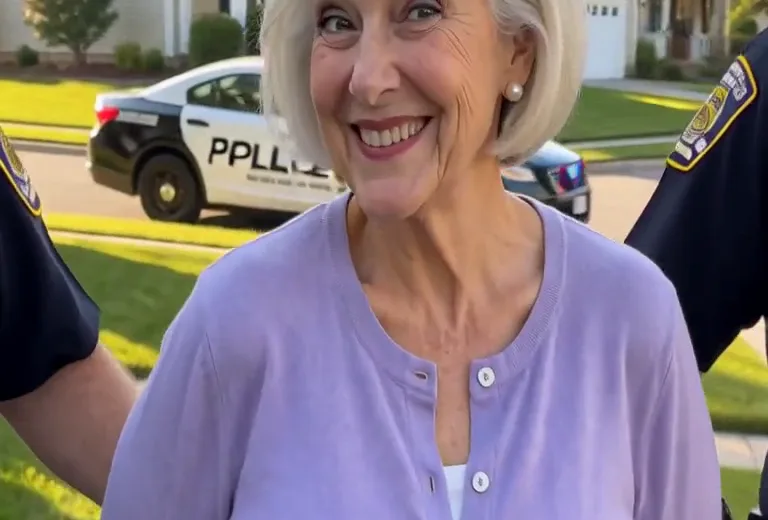
The lesson: writing “no badges” is not enough on its own. A fake department patch is the single detail that makes an obvious parody clip look like it is pretending to be real — so crop the officers to plain dark sleeves at the frame edges, and inspect every result before it leaves your drafts.
And check the face at the end, not the start. A photo that looks nothing like any celebrity can still drift during motion; each run is a new generation, so a clip that fails one check may pass on regenerate.
AI Arrest Filter vs the CapCut Template
Many of the arrest clips on TikTok come from a CapCut template: find the template, drop in your photo, export with the template's corner mark and caption style. A prompt-based generator gives you more control. Neither is “the official” version — the trend is the format, not one app.
| Prompt-based generator | CapCut template | |
|---|---|---|
| Control over scene | You choose place, reaction, framing, lighting | Fixed scene; only the photo changes |
| Watermark | Clean output, no template mark | Template corner mark and caption style |
| Consistency | Every generation differs; may need retries | Same result every time |
| Skill needed | Paste a prompt, check the output | None — upload and export |
Related One-Photo Trends
The AI arrest filter sits in a family of one-photo video effects that all follow the same recipe: upload a photo, let a model animate a dramatic reaction. Siblings from the same weeks include the AI mugshot maker (the booking-photo still, if you want an image instead of a clip — you can try that style on our free AI image generator), the AI crying filter, the AI scared-face effect, and the Hotel Lobby AI video. If one photo-to-video format works for you, the others usually do too.
AI Arrest Filter FAQ
Is there a free AI arrest filter?
Yes. Most image-to-video generators offer free credits to new accounts, and the CapCut template route is free. Check each tool's pricing before you start — you can compare options in the AIXList directory.
Is the “police” version the same trend?
Yes. It appears in search under names with “police” in them and under the caption “getting arrested again”, but the clips reviewed under both names are the same format: one photo becomes a short clip of two officers walking you out while you laugh at the camera.
How do I do the AI arrest filter on TikTok or Instagram?
Make the clip first — with an image-to-video generator or the CapCut template — then download it and upload to TikTok or post it as a Reel with the trend's caption. Use a photo of someone who is in on the joke; the format only works when the person is clearly laughing along.
What kind of photo works best?
A clear photo with one or more people (or pets), face visible, even light. Everyday snapshots beat posed studio shots — the more normal the person looks, the bigger the punchline.
Why does the AI sometimes add extra limbs or weird hands?
Current video models still struggle with hands, fingers, and how people grip objects — especially in a scene built around handcuffs. In this trend the glitches are part of the charm; if they bother you, regenerate or tighten the framing.
Is the AI arrest filter real footage?
No. Every clip in this trend is AI-generated parody. Never present one as a real arrest — keep the joke obvious, avoid real department names, badges, and uniforms in frame, and only use photos of people who consented to the bit.
The Bottom Line
The clips that survive quality checks share three things: a tight frame on the person, plain dark sleeves on the officers, and a face that was checked after the video — not just before. Get those right and the AI arrest filter is one of the easiest trends to join from a single photo.
AIXList is an independent AI tools directory. This article is an independent explainer of a social media trend; product names and trademarks mentioned belong to their respective owners, and AIXList is not affiliated with, endorsed by, or sponsored by any of them. Trend statistics and test observations are summarized from publicly published reports as of early October 2026 and may be unconfirmed. All clips described are AI-generated parody — not real arrest footage.
Find the Right AI Video Tool
Compare image-to-video generators and pick one to make your own arrest filter clip.
Browse AI Video Tools